
Remote interviews have gone from being a rare exception to a normal part of hiring. Whether you’re applying for a fully remote role or just going through an early screening call, chances are you’ll need to perform well on camera at some point.
This guide is for job seekers who want practical, realistic preparation, not generic advice like “dress nicely and be confident.” I’ve helped friends, relatives, and coworkers prep for remote interviews over the years, and I’ve seen strong candidates stumble for reasons that had nothing to do with their skills. I’ve also watched nervous beginners absolutely nail it with the right preparation.
If you’ve never done a remote interview before—or if past ones felt awkward or unsuccessful—this article will walk you through what actually matters and how to prepare step by step.
What Is a Remote Interview?
A remote interview is any job interview conducted online instead of in person. This usually happens through video conferencing platforms, but sometimes by phone.
Common formats include:
- Live video interviews (one-on-one or panel)
- Recorded video interviews where you answer pre-set questions
- Phone interviews (still common for first rounds)
- Technical or skills-based interviews done remotely
Remote interviews test the same things as in-person interviews—your experience, communication, and problem-solving—but they also quietly evaluate how well you handle technology, structure, and remote communication.
People often don’t realize this part until it costs them an offer.
What Remote Interviews Are Like in Real Life
Remote interviews feel different than in-person ones, even if the questions are similar.
You’re sitting alone, often staring at your own face, trying to sound natural while dealing with:
- Slight audio delays
- Awkward pauses
- Reading body language through a screen
- Managing notes without looking distracted
I once watched a qualified friend lose momentum simply because they kept glancing at another monitor. The interviewer later mentioned they seemed “disengaged,” even though they were reading talking points.
Remote interviews reward clarity, structure, and presence more than charisma.
What You Need Before the Interview (Beyond a Resume)
Technical Must-Haves
These aren’t optional. They’re the baseline.
- Stable internet connection
- Working webcam and microphone
- A quiet, private space
- Laptop or desktop (phones are risky)
- Installed and tested interview platform (Zoom, Teams, Google Meet, etc.)
From what I’ve seen, audio problems ruin more interviews than bad answers. Borrow a headset if you need to.
Environment Setup
Your surroundings matter more than you think.
- Neutral background (real or virtual)
- Good lighting facing your face (not behind you)
- Camera at eye level
- Chair that doesn’t squeak or swivel wildly
A cousin of mine once interviewed from a kitchen table with family walking behind them. They didn’t get the job, and yes—it came up in feedback.
A Mindset Shift That Helps Before Remote Interviews
One thing people rarely talk about is how much mindset affects remote interviews.
In real situations, I’ve noticed that candidates who treat remote interviews as something “unnatural” or “inferior” tend to tense up. They overthink every pause, every facial expression, and every tiny delay. On the other hand, people who treat it like a normal professional conversation; just through a screen; often come across as calmer and more confident.
I’ve watched a friend completely change their interview performance just by reframing it. Instead of thinking “I’m being judged on camera,” they started thinking “I’m explaining my work to another professional.” Same skills, same experience—very different outcome.
Before your interview, remind yourself:
The interviewer chose this format too. They’re not expecting perfection. They’re expecting clarity, effort, and professionalism.
Skills Interviewers Look for in Remote Candidates
Must-Have Skills
These are non-negotiable for remote roles:
- Clear verbal communication
- Ability to explain work without visual cues
- Comfort with basic technology
- Professional self-management
- Listening without interrupting
Nice-to-Have Skills
These can set you apart:
- Structured answers (clear start, middle, end)
- Calm handling of tech issues
- Thoughtful questions
- Awareness of remote work challenges
- Ability to self-correct mid-answer
People often assume experience alone carries them. In remote interviews, how you communicate matters just as much as what you’ve done.
How Beginners Should Prepare Step by Step
Step 1: Understand the Role in Practical Terms
Don’t just read the job description. Ask:
- What does a typical workday look like?
- Who will I communicate with and how often?
- What problems will I solve weekly?
This helps you answer questions with relevant examples, not generic stories.
Step 2: Prepare Structured Answers
Use a simple framework like:
- Situation
- Task
- Action
- Result
Write short bullet notes, not full scripts. Reading answers sounds obvious on video.
I’ve seen people tank interviews because they memorized answers word-for-word and froze when interrupted.
Step 3: Practice Out Loud (Yes, Actually Out Loud)
Silent prep isn’t enough.
- Record yourself answering common questions
- Listen for rambling or filler words
- Practice pausing instead of rushing
Almost everyone sounds different on camera than they expect.
Step 4: Do a Full Tech Test
At least one day before:
- Test your camera and mic
- Check internet stability
- Log into the platform
- Close unnecessary apps
This alone reduces stress dramatically.
Common Remote Interview Mistakes to Avoid
Over-Reliance on Notes
Notes are fine. Reading them is not.
Interviewers can tell when your eyes are scanning text. Keep notes minimal and use them as prompts only.
Multitasking
Don’t check notifications. Don’t glance at emails. Don’t type unless asked.
Remote interviews magnify distractions.
Speaking Too Fast
Nerves make people rush. Slow down.
Pauses feel longer to you than to the interviewer.
Ignoring Body Language
- Sit upright
- Nod occasionally
- Maintain eye contact with the camera
One hiring manager told me they rejected candidates who “looked bored,” even though they answered well.
Realistic Expectations About Remote Interviews
Remote interviews are not easier than in-person ones. In many cases, they’re more competitive.
You should expect:
- Multiple rounds
- Shorter attention spans from interviewers
- Fewer chances to recover from mistakes
- Strong competition from wider geographic areas
That said, preparation helps more here than almost anywhere else. A well-prepared average candidate often outperforms an unprepared experienced one.
Practical Tips That Actually Help
Here are things I’ve seen work repeatedly:
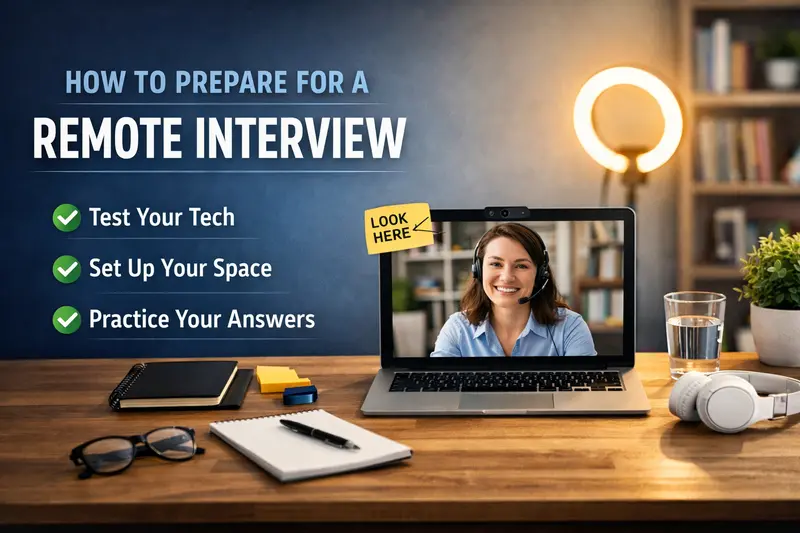
- Place a small sticky note near your camera that says “LOOK HERE”
- Keep a glass of water nearby
- Wear solid colors instead of patterns
- Smile before answering—your voice changes when you do
- Prepare 2–3 thoughtful questions about the role, not just the company
One friend landed a remote role largely because they asked insightful questions about communication expectations. It showed they understood remote work realities.
Why Remote Interviews Can Actually Work in Your Favor
Remote interviews get a bad reputation, but they come with real advantages—especially if you prepare.
From what I’ve seen, remote interviews:
- Reduce some social pressure compared to in-person meetings
- Allow you to control your environment
- Give you a moment to pause and think before answering
- Make preparation more visible (notes, structure, calm delivery)
I’ve seen candidates who struggled in office interviews do surprisingly well remotely. One person I helped was very soft-spoken in person, but on camera—with fewer distractions—they explained their work clearly and confidently for the first time.
If you’re someone who communicates better in structured conversations, remote interviews can be a quiet advantage.
A Real Example: When “Not Perfect” Still Gets the Job
One of the most reassuring lessons I’ve learned is that you don’t need a flawless interview to succeed.
I once watched someone lose their internet connection mid-interview. They came back flustered, apologized briefly, and then calmly picked up where they left off. No over-explaining. No panic.
They got the job.
The feedback later was simple: “They handled the problem professionally.”
Remote work isn’t about never having issues—it’s about how you respond when they happen. Staying composed and practical can matter more than a perfectly rehearsed answer.
Small Confidence Boosters That Add Up
These are small things, but I’ve seen them make a difference more than once:
- Start with one strong answer. Your first response sets your tone.
- Sit comfortably, not rigidly. Comfort shows in your voice.
- Pause before answering. Thoughtfulness reads as confidence.
- Treat it like a conversation, not a performance.
A lot of people don’t realize that interviewers are often multitasking mentally too—taking notes, checking time, managing their own nerves. When you speak clearly and steadily, you make their job easier, and that works in your favor.
Encouragement for First-Time Remote Interviewees
If this is your first remote interview, it’s okay to feel unsure.
Everyone I’ve helped through this—friends, family, coworkers—has felt awkward the first time. Almost all of them walked away thinking, “That wasn’t as bad as I expected.”
Remote interviews are a skill. Like any skill, they improve quickly with practice. Even one or two interviews can dramatically change how comfortable you feel.
You don’t need to be “great on camera.”
You just need to be prepared, present, and human.
More Questions About Remote Interview Preparation…
How early should I log into a remote interview?
Aim to log in 5–10 minutes early. This gives you time to handle last-minute updates or audio issues without panic. Logging in too early (15–20 minutes) can feel awkward if the interviewer joins late. Use the extra time to breathe, check posture, and mentally review key points.
Is it okay to use notes during a remote interview?
Yes, but sparingly. Short bullet points are fine. Reading full answers is not. Interviewers expect eye contact and natural conversation. Use notes as reminders, not scripts. Keep them near the camera so your gaze doesn’t wander.
What should I wear for a remote interview?
Dress as you would for an in-person interview at that company—at least from the waist up. Solid colors work best on camera. Avoid busy patterns or overly casual clothing. When in doubt, slightly overdress rather than underdress.
How do I calm nerves before a remote interview?
Preparation is the biggest anxiety reducer. Beyond that, do a short breathing exercise, stretch your shoulders, and remind yourself that pauses are okay. Everyone expects a bit of nervousness—it’s how you handle it that matters.
What if technical issues happen during the interview?
Stay calm and communicate clearly. Apologize briefly, explain the issue, and suggest a solution. Interviewers care more about how you handle problems than the problem itself. Panicking does more damage than a dropped connection.
Honest Expectations and Encouragement
Remote interviews can feel unnatural, especially at first. That’s normal. Most people struggle early on—not because they’re unqualified, but because they underestimate how different the format is.
From what I’ve seen, the candidates who succeed treat remote interviews as a skill to practice, not a personality test. They prepare intentionally, control what they can, and don’t panic when things aren’t perfect.
If you take the time to prepare properly, you’re already ahead of a large percentage of applicants.