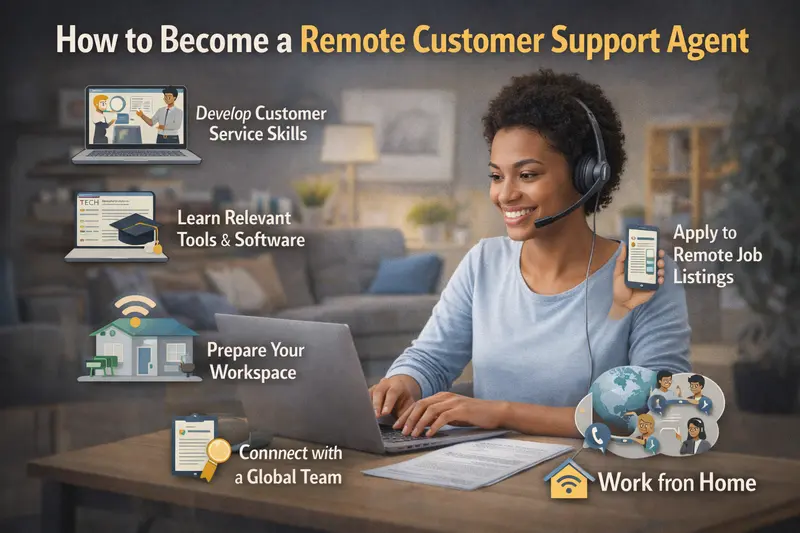

Remote customer support is one of the most common entry points into online work, and for good reason. It doesn’t usually require a degree, many roles offer paid training, and companies hire year-round. I’ve watched friends move into remote customer support after layoffs, new parents use it to stay home with their kids, and career changers use it as a bridge while figuring out their next move.
At the same time, people often underestimate what the job actually involves. It’s not just “answering emails in pajamas.” Real customer support work comes with schedules, performance metrics, difficult customers, and real expectations. Some people thrive in it. Others burn out quickly.
This guide is for anyone seriously considering becoming a remote customer support agent and wanting an honest picture of what it takes, how to start, and what to expect once you’re hired.
What Is a Remote Customer Support Agent?
A remote customer support agent helps customers resolve issues, answer questions, or complete tasks using online tools instead of working in a physical call center or office. You work from home (or another quiet location) and communicate through:
- Phone calls
- Live chat
- Email or ticket systems
- Social media or messaging platforms
Some roles are phone-heavy, while others are chat-only or email-based. Many beginners aim for non-phone roles, but phone support still makes up a large portion of entry-level remote jobs.
In real situations, agents handle things like:
- Password resets
- Order tracking and refunds
- Billing questions
- Technical troubleshooting
- Account changes or cancellations
From what I’ve seen, companies value reliability and communication skills more than fancy credentials. They want people who can follow processes, stay calm, and show up consistently.
What Does the Job Look Like Day to Day?
This is where expectations matter. A typical day for a remote customer support agent might include:
- Logging into company systems at a scheduled time
- Checking your queue for calls, chats, or tickets
- Following scripts or knowledge base articles
- Documenting every interaction carefully
- Meeting response time and satisfaction metrics
Many roles track performance closely. Things like average handle time, customer satisfaction scores, and adherence to schedule are monitored. One friend of mine was surprised by how strict break timing was, even while working from home.
It’s also emotionally demanding. Some customers are frustrated, confused, or angry before you even say hello. Learning not to take that personally is a big part of staying in the job long-term.
That said, there are upsides. No commute, fewer office distractions, and the ability to work in a controlled environment make a real difference for many people.
Skills You Need to Become a Remote Customer Support Agent
Must-Have Skills
These are non-negotiable for most companies:
- Clear written and verbal communication
- Basic computer skills (typing, navigating multiple tabs, using software tools)
- Reliable internet connection
- Time management and punctuality
- Ability to follow procedures consistently
People often underestimate typing speed. Chat-based roles especially require fast, accurate typing while reading and responding at the same time.
Nice-to-Have Skills
These can help you stand out or move into better roles:
- Previous customer service experience (retail, call centers, hospitality)
- Experience with CRM tools
- Technical troubleshooting basics
- Conflict resolution skills
- Multitasking under pressure
I’ve seen retail workers transition smoothly into remote support because they already know how to handle difficult customers face-to-face.
How Beginners Usually Get Started Step by Step
Step 1: Set Up a Proper Home Workspace
Most companies require:
- A quiet, private room
- A desk and comfortable chair
- A wired internet connection
- A headset with a microphone
Some employers provide equipment, but many expect you to have your own. One common beginner mistake is applying before checking technical requirements.
Step 2: Create a Customer-Focused Resume
Even if you’ve never worked remotely, highlight:
- Any customer-facing experience
- Communication responsibilities
- Problem-solving examples
- Reliability and attendance
Avoid flashy designs. Simple, clear resumes perform better in applicant tracking systems.
Step 3: Apply on Legitimate Job Boards and Company Sites
Look for:
- Company career pages
- Reputable remote job boards
- Well-known outsourcing companies
Be cautious of listings that ask for upfront fees or promise unusually high pay for entry-level work.
Step 4: Prepare for Online Interviews and Assessments
Many companies use:
- Recorded video interviews
- Typing tests
- Role-play scenarios
Practice speaking clearly and calmly. I’ve watched capable people fail interviews simply because they rushed answers or didn’t explain their thinking.
Step 5: Complete Training and Onboarding
Training may last anywhere from a few days to several weeks. Attendance and participation matter. Companies often evaluate trainees before offering permanent roles.
Common Mistakes and Real Risks to Watch For
Underestimating the Emotional Load
Customer support can be draining. Back-to-back calls with unhappy customers wear people down faster than expected.
Assuming All Remote Jobs Are Flexible
Many roles have fixed schedules, mandatory shifts, and limited time off. Remote doesn’t always mean flexible.
Ignoring Technical Requirements
Weak internet, background noise, or outdated computers can cost you a job offer.
Falling for Scams
Legitimate companies do not:
- Ask for application fees
- Send checks before hiring
- Hire exclusively through messaging apps
If something feels rushed or vague, it usually is.
Realistic Expectations for Pay and Growth
Pay varies widely depending on:
- Company
- Location
- Type of support (phone vs chat)
- Experience level
Entry-level remote customer support roles often start around typical hourly customer service wages for the region. Some pay more for overnight shifts, specialized support, or bilingual skills.
Growth opportunities do exist:
- Senior agent roles
- Quality assurance
- Team lead or supervisor positions
- Training or onboarding roles
I’ve seen people stay in support for years and build stable remote careers, while others use it as a stepping stone into operations, tech, or project coordination.
Practical Tips From Real Experience
- Track your metrics early so nothing surprises you later
- Ask questions during training, even if they feel basic
- Develop scripts in your own words to sound natural
- Protect your work-life boundaries when working from home
- Take care of your voice and posture if you’re on calls all day
One small habit that helped a friend was standing up and stretching during breaks. It sounds minor, but it reduced burnout significantly.
Frequently Asked Questions
Can I become a remote customer support agent with no experience?
Yes, many companies hire beginners with no formal experience. What matters most is communication ability, reliability, and willingness to learn. Retail, hospitality, or volunteer experience often counts, even if it wasn’t labeled as “customer support.” Training programs are designed for beginners, but you’ll still need to show professionalism and comfort with basic technology.
Are there remote customer support jobs that don’t require phone calls?
Yes, but they are more competitive. Chat-only or email-based roles exist, often in e-commerce or software companies. These positions usually require faster typing, strong written communication, and sometimes prior experience. Beginners should apply broadly rather than limiting themselves only to non-phone roles.
Is remote customer support a long-term career?
For some people, yes. It depends on your goals and tolerance for customer-facing work. Many agents build long-term careers by moving into leadership or specialized roles. Others use it temporarily while studying, caregiving, or transitioning careers. There’s no single “right” path.
What equipment do companies usually require?
Most require a computer, wired internet connection, and a headset. Some specify minimum system requirements. A quiet environment is often mandatory, and background noise can disqualify applicants. Always read job descriptions carefully before applying.
How long does it take to get hired?
It varies. Some companies hire within a week, while others take several weeks due to assessments and background checks. Applying to multiple roles increases your chances, but quality applications matter more than volume.
Final Thoughts…. Is This the Right Remote Job for You?
Remote customer support isn’t easy, but it’s one of the most accessible ways to break into remote work. I’ve seen it provide stability during tough times and flexibility when life demanded it. I’ve also seen people leave quickly because they underestimated the structure and emotional demands.
If you value clear expectations, steady income, and remote work without needing advanced credentials, this path is worth considering. Go in informed, prepared, and realistic, and you’ll give yourself the best chance of success.