
If you’re job hunting, chances are your resume has already been opened, closed, ignored, or skimmed in under 10 seconds. That can feel frustrating; especially when you know you have the skills. The good news is that you don’t always need a full rewrite or hours of work to make meaningful improvements.
This guide is for busy job seekers: students, career changers, parents returning to work, or professionals applying after long days. These are realistic, practical resume improvements you can make in about 10 minutes; not fluff, not hype, and not advice that assumes you have endless time or perfect confidence.
From what I’ve seen helping friends and family tweak resumes right before deadlines, small changes often make the difference between no response and an interview request. Let’s get into what actually helps.
What Does “Improving Your Resume” Really Mean?
Improving your resume doesn’t always mean adding more. In real situations, it usually means making things clearer, easier to scan, and more relevant to the job you’re applying for.
Hiring managers and recruiters are often:
- Scanning dozens (or hundreds) of resumes
- Looking for quick proof you match the role
- Skimming headlines, job titles, and bullet points
A better resume:
- Highlights value quickly
- Removes confusion
- Uses simple, direct language
- Matches the job description more closely
You don’t need to be perfect. You just need to be easy to understand in seconds.
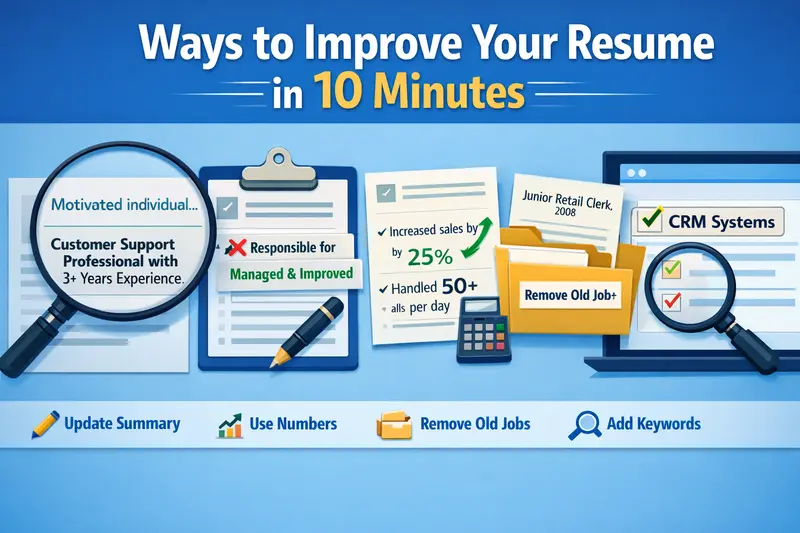
1. Replace Your Resume Summary With a Clear Value Statement
If your resume starts with something like “Hardworking professional seeking opportunities to grow”, this is one of the fastest fixes you can make.
In 2–3 lines, answer this instead:
- What role are you targeting?
- What experience or skill do you bring?
- What problem do you help solve?
Example before:
Motivated individual with strong communication skills.
Example after:
Customer support professional with 3 years of experience handling email and chat support, focused on resolving issues quickly and improving customer satisfaction.
I’ve watched a friend swap out a vague summary like this five minutes before submitting an application—and it was the version that finally got a callback.
2. Scan for Weak Phrases and Replace Just One or Two
You don’t need to rewrite every bullet point. In 10 minutes, just find 2–3 weak phrases and strengthen them.
Look for words like:
- Responsible for
- Helped with
- Worked on
- Assisted
Then replace them with clearer action language.
Instead of:
Responsible for managing social media accounts
Try:
Managed daily content and customer responses across three social media platforms
This small change shows ownership, not just participation.
3. Add Numbers Where They Naturally Fit
You don’t need fancy metrics or exact figures. Even rough, honest numbers help.
Look at one job entry and ask:
- Did you handle volume?
- Did you work with customers?
- Did you support a team?
Examples:
- Handled 40–60 customer emails per day
- Supported a team of 5 sales representatives
- Processed weekly reports for 100+ accounts
People often assume numbers must be impressive. They don’t. They just make your work more real.
4. Remove One Irrelevant Job or Old Detail
If your resume feels crowded, don’t add more—cut one thing.
In real hiring situations:
- Jobs from 10–15 years ago often don’t help
- Unrelated roles can distract from your goal
If you’re applying for office or remote roles, that summer retail job from years ago might not need full bullet points anymore.
You can:
- Shorten it to one line
- Remove bullet points
- Or remove it entirely
I’ve seen resumes improve instantly just by creating more white space.
5. Adjust Your Job Titles (Without Lying)
Many people don’t realize this: internal job titles often don’t match market titles.
If your title was:
- “Customer Happiness Hero”
- “Operations Ninja”
You can safely adjust it to something clearer as long as it’s honest.
Example:
Customer Happiness Hero (Customer Support Representative)
This helps both recruiters and automated systems understand your role.
6. Match One Keyword From the Job Posting
Applicant tracking systems (ATS) matter—but you don’t need to obsess.
In 10 minutes:
- Look at the job description
- Find one repeated skill or phrase
- Add it naturally to your resume
Example:
If the job mentions “CRM systems” and you’ve used one, add:
Experienced using CRM systems to track and resolve customer issues
This isn’t gaming the system—it’s speaking the employer’s language.
7. Fix Formatting Issues That Hurt Readability
Formatting problems quietly hurt good resumes.
Quick checks:
- Are bullet points aligned?
- Is font size consistent?
- Is there too much text per line?
If your resume looks dense, increase spacing slightly or shorten long paragraphs into bullets.
Recruiters don’t read—they scan.
8. Update Your Skills Section (Don’t Overthink It)
Your skills section should be:
- Relevant
- Easy to scan
- Honest
In 10 minutes:
- Remove outdated tools
- Add 1–2 skills you actually use
- Group similar skills together
Example:
Instead of a long list, try:
- Customer Support: Email, chat, ticketing systems
- Tools: Google Workspace, CRM software
- Soft Skills: Problem-solving, clear communication
People often underestimate how much this helps clarity.
9. Fix One Grammar or Tense Issue Throughout
Nothing breaks trust faster than inconsistency.
Choose one:
- Past tense for past jobs
- Present tense for current role
Then quickly scan and fix just that.
You don’t need perfection—just consistency.
10. Rename the File Properly
This sounds small, but it matters.
Instead of:
Resume_Final_V3.pdf
Use:
FirstName_LastName_Resume.pdf
From what I’ve seen, recruiters really do notice this. It makes you easier to remember and easier to find.
Common Mistakes People Make When Rushing Resume Updates
When people rush, they often:
- Add too much instead of refining
- Copy phrases they don’t fully understand
- Overstuff keywords
- Leave formatting half-fixed
Ten focused minutes beats one hour of unfocused edits.
What to Expect From These 10-Minute Improvements
Let’s be realistic. These changes:
- Won’t guarantee interviews
- Won’t fix a totally mismatched resume
- Won’t replace experience
But they can:
- Improve clarity
- Reduce rejection due to confusion
- Make your resume easier to scan
- Help you feel more confident clicking “apply”
I’ve watched people apply with the same resume for months, make a few of these small tweaks, and finally start hearing back.
Practical Tips From Real Experience
- Save one strong version and tweak from there
- Don’t chase perfection before every application
- Apply even if your resume isn’t “done”
- Small improvements compound over time
One mistake I see often is people delaying applications while endlessly editing. Sometimes, good enough today is better than perfect later.
Frequently Asked Questions
Can a 10-minute resume update really make a difference?
Yes, especially if your resume already has relevant experience but lacks clarity. Recruiters often reject resumes not because candidates are unqualified, but because the resume doesn’t clearly show the match. Improving wording, formatting, or keywords can make your experience easier to understand quickly. While it won’t fix deeper gaps, it can absolutely improve response rates.
What part of the resume should I prioritize if I only have a few minutes?
Start with the summary or top third of the resume. That’s what gets read first. A clear headline, relevant job title, and strong opening lines can keep a recruiter reading longer. If you still have time, fix one or two bullet points under your most recent role.
Should I tailor my resume for every job?
Ideally yes, but realistically, even small tailoring helps. In short time frames, just adjust your summary and add one keyword from the job posting. That alone can improve relevance without rewriting the entire resume.
Is it okay to remove older jobs?
Yes. If older roles no longer support your current career direction, shortening or removing them is often helpful. Employers care most about recent, relevant experience. Keeping everything can dilute your message.
Do resume design and formatting really matter?
They matter more than people admit. A clean, readable layout makes it easier for recruiters to find what they need. You don’t need fancy design; just consistent formatting, spacing, and clear sections.
Honest Conclusion of mine….
Improving your resume doesn’t always require a full overhaul or hours of stress. Ten focused minutes, used wisely, can make your experience clearer, stronger, and easier to recognize.
From what I’ve seen in real job searches, the people who succeed aren’t the ones with perfect resumes; they’re the ones who keep improving and keep applying. If you’ve been stuck or discouraged, start small. One improvement today is better than none.
You don’t need to be done. You just need to be clear enough to be considered.